Do you also want to migrate Lotus Notes Emails to Outlook? In this article, we’ll explain in detail both applications, the reasons for migration, and the manual method to transfer emails from Lotus Notes to Outlook. Both Lotus Notes and MS Outlook are advanced email migration programs that help users send and receive mail, save contacts, to-do lists, and more.
Overview
- Lotus Notes, now known as HCL Notes, is a proprietary collaborative software platform for businesses that provides workspaces for email, instant messaging, calendaring, and custom applications.
- Outlook is a personal information manager and email client developed by Microsoft. It organizes email, calendar, tasks, and contacts in one place. It is part of the Microsoft Office suite and is available on desktop and mobile devices, as well as via a web browser.
Also Read:- How to migrate Lotus Notes emails to Outlook.com?
Reasons why the users need to migrate to MS Outlook
- The interface of this MS Outlook is user-friendly; for this reason, even a non-technical person can easily use this application.
- In the Lotus Notes application, the user cannot access multiple accounts simultaneously; every time he needs to add authentication details, it is time-consuming.
- MS Outlook is a free software available, so even novice users can easily fix errors. Lotus Notes, on the other hand, has a complex user interface.
- MS Outlook offers many advanced features and can be synchronized with smartphones, allowing users to access their email even offline. This is another reason for conversion.
Smart Solution to transfer lotus notes email to outlook
The best solution for transferring Lotus Notes emails to Outlook is the eSoftTools Lotus Notes to Outlook Converter software. Transfer HCL/IBM and Lotus Notes profile data to any version of MS Outlook. Get smart features to easily convert Lotus Notes NSF database files to PST and many other Outlook-compatible formats. Users can use it to convert NSF files to PST, Zimbra, vCard, CSV, MBOX, HTML, Gmail, Office 365, Yahoo Mail, and many other file types.
How to transfer lotus notes email to outlook?
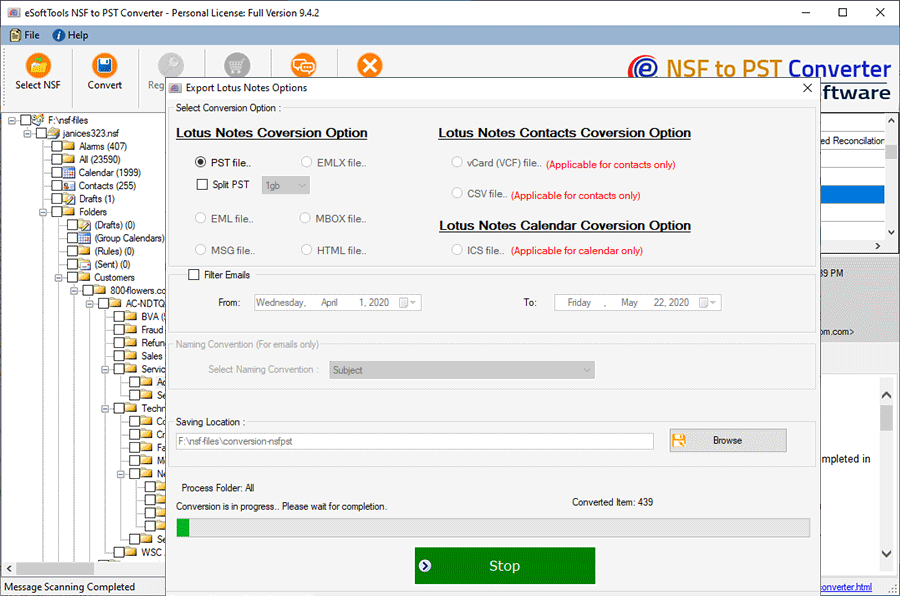
Launch the Lotus Notes to Outlook Converter software on your computer.

Now, open the Lotus Notes NSF file and show the preview panel

- In the Export tab, after browsing to the location where you want to save the file, select the “Save As” option. Several options will be available, but you should choose CSV (Comma-Separated Values) and click the Export Now button.
- Press the File tab from the taskbar and select “Export” from the options.

Finally, click on the convert button and start the process.
Key Features
- Transfer Lotus Notes emails to Outlook with a very easy process.
- Migrate every Lotus Notes mailbox component from it – email, contacts, calendars, and other items.
- Preserve each item exported from NSF to new PST files in the same format with each property.
- It allows converting multiple Lotus Notes NSF files simultaneously with the bulk conversion feature.
- Users have more export options – convert NSF to MSG, EML, MBOX, vCard, ICS, CSV, and more.
- Migrate Lotus Notes to Office365, Gmail, Yahoo Mail, Outlook.com, and other cloud email services.
- It is developed to work on Windows operating systems – 11, 10, 8.1, 8, 7, XP, Vista, or earlier versions.
Conclusion
Using the eSoftTools Lotus Notes to Outlook Converter software, users can easily transfer their Lotus Notes emails to Outlook without any issues or data loss. In this blog, we have explained the step-by-step method of transferring Lotus Notes emails to Outlook, through which users can transfer NSF emails to Outlook in a very simple process. Apart from this, users can also try the free demo of this software.
FAQ
Does this tool import NSF files directly into the MS Outlook application?
Yes, you can get PST files containing Lotus Notes and NSF file data, which you can easily import into your Outlook profile or application.
Is it necessary to have MS Outlook on the computer to convert NSF to PST using this tool?
No, this software enables users to convert NSF to PST even if users do not have the MS Outlook application on their computer.
Will this allow me to perform NSF file conversion without needing a Lotus Notes email client?
No, Lotus Notes must be installed on the user’s machine, and a dummy profile must also be configured.
Can it export Lotus Notes emails with attachments from NSF to PST files?
Export Lotus Notes emails in original form with attachments and other properties like message content, signature, header information, etc.
How will the naming convention feature of this software help me?
The naming convention works with a variety of conversion options – HTML, MHTML, EML, EMLX, PDF, and MSG. Choose a naming format from 9+ options and easily name the resulting files in that format.

No Comments yet!