Are you also looking for a solution to extract attachments from Office 365 accounts? If so, you’ve come to the right place, as this article will explain the easiest way to extract attachments from Office365 accounts or any IMAP-based account. So keep reading this blog.
What is Office365?
Microsoft Office 365 Cloud, formerly known as Office 365, is a cloud-based software that provides email services, including sending and receiving emails, calendar management, contact management, and email organization. Microsoft offers various subscription plans for users to take advantage of and start using the Office 365 online email system.
Also Read:- How to Extract Attachments from IMAP Email Accounts?
Instant Solution to Extract Attachments from Office365 accounts
The best solution to extract attachments from Office365 accounts is eSoftTools IMAP Attachment Extractor Software. Through this software, you can extract all types of attachments or attachments with a specific extension from Office365 account. This software does not make any changes to users’ IMAP mailbox data and provides results with complete accuracy for extracting IMAP email attachments. Users can download attachments from all web and cloud email apps, including Gmail, Office365, Yahoo Mail, Hostmonster, GoDaddy Mail, Yandex, Outlook.com, Hotmail, AOL, and all other supported IMAP-based email apps.
Features of IMAP Attachment Extractor Software
- Extract attachments from Office365 accounts instantly with this software.
- Users can easily extract attachments from the Inbox, Outbox, Calendar, Contacts, Tasks, Notes, and all other mail folders.
- Most of the popular email servers like Gmail/G-suite, Hotmail, YahooMail, Office365, Outlook.com, and WebMail are fully supported by this software.
- Users can select the appropriate options from it, like extracting folder-wise attachments or extracting message-wise attachments to their local computer.
- Many options are available in this software, like PDF, GIF, doc, xls, HTML, cvs, rar, zip etc.
- The user-friendly interface is the best thing for users, as this software has an easy-to-understand interface. They can easily extract attachments from IMAP emails.
- Users can run this tool on all Windows operating systems, such as 8.1, 8, 11, 10, 8.7, XP, Vista, etc.
How to Extract Attachments from Office365 accounts?
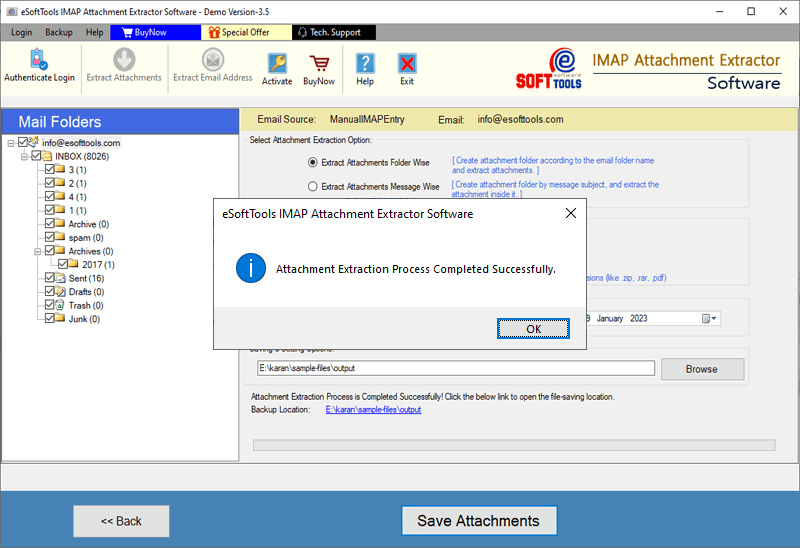
- Download and install the IMAP Attachment Extractor software on your desktop.
- Select the Office 365 cloud IMAP server.

- Enter the Office 365 ID and password for authentication.

- All mail folders are visible in the left panel of the software.
- Now select the folders from the left panel from which you want to extract attachments and click on the “Remove Attachments” option from the toolbar.

- Select the options you need from the wizard provided and proceed.
- Enter a location on your computer to save the resulting files.

- Click Save Attachments. It will take a few moments, and the attachments will be successfully saved to your desktop.
Conclusion
Users want to extract attachments from Office 365 or other IMAP-based email applications. Keeping this problem in mind, I have written this article. The best way to extract attachments from Office 365 accounts is eSoftTools IMAP Attachment Extractor Software. It also offers a free trial version in which you can extract 15 attachments from each folder.
FAQ
Can this tool extract attachments from emails received from IMAP servers?
Users can easily extract attachments from emails, contacts, calendars, and other items from IMAP server accounts.
This will allow users to extract email addresses from IMAP account emails.
Users can securely extract email addresses from the TO, BCC, FROM, and CC attributes of emails. All extracted email addresses are provided as TXT, HTML, and CSV files.
Does the software provide the facility to extract attachments from emails of a specific date range?
Mail filtering option is also available in the software, which helps users to easily remove attachments from emails of specific dates.
Does this software make any changes to the IMAP account data while extracting attachments?
No, the software never makes any changes to the IMAP account data and maintains complete integrity of the data.
In which version of the Windows operating system can I run this software that extracts attachments?
Yes, users can easily run the software on Windows 11, 10, 8.1, 8, Vista, XP, and earlier versions.

No Comments yet!