Looking to export your Office 365 emails to EMLX format? Need a direct method to accomplish this on a Windows PC? Your search stops right here because you have found the right place. In this guide, we will demonstrate the process of exporting Office 365 emails to EMLX files using Windows. Let us begin…
Overview
These days, Microsoft Office 365 ranks among the most popular cloud services. Office 365 gives users the ability to access all applications of the Office suite via the web. The online version of Outlook is also included in Office 365, which we refer to as Outlook 365.
Office365 and Outlook365 assist users in sending and receiving emails. All data concerning Outlook365 email profiles is securely maintained by Microsoft on its cloud servers.
Users can access their Office365 profiles from anywhere in the world via a web browser. Additionally, Office 365 offers excellent security features and an easy-to-use interface. For these reasons, many individuals and businesses are using Office 365.
Moreover, in some cases, Office365 users need to extract and preserve their email profile data as EMLX files.
Also Read:- How to Migrate Office 365 to Zoho Mail?
Why do users need to export Office 365 emails to EMLX files in Windows?
Users may need to export their Office 365 emails to EMLX files for multiple reasons. Nevertheless, these two are the most typical:
- Since Office365 is web-based, users need the internet to view their profile in a browser. Still, you can download your Office365 emails as EMLX files to a local drive and access them offline.
- Apple Mail is compatible with the EMLX file format. You can access Office 365 emails on a Mac via Apple Mail by exporting them as EMLX files.
To obtain these advantages, users prefer exporting Office365 emails to EMLX files. However, lacking sufficient knowledge, they find themselves unable to do so.
Direct Method to Export Office 365 emails to EMLX files in Windows
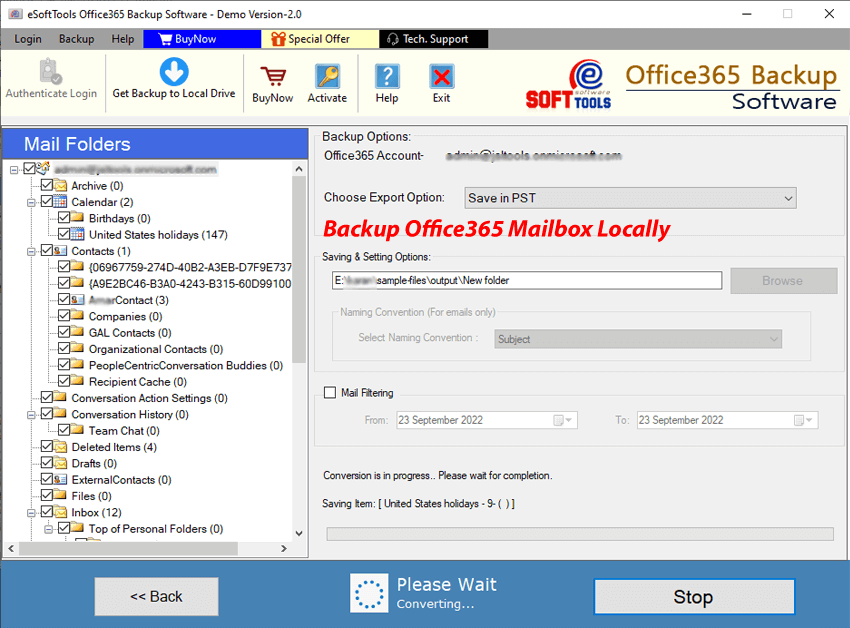
Using eSoftTools Office365 Email Backup software, you can easily export emails from your Office365 mailbox to a local drive as EMLX files. This tool will easily export emails from your Office365 account to EMLX files. Windows PC users can easily back up emails using this software. It downloads all emails with complete security and a simple process. Furthermore, it offers several features to make the Office365 email export process more reliable and easier for users.
How to Export Office 365 emails to EMLX files in Windows?
- Get the eSoftTools Office365 Backup software downloaded and set it up on your Windows PC.
- First of all, type in your Office365 email address and hit Login.

- Next, enter your Office365 email address and password on the screen, and click Sign In.

- Sign in using your Office365 account and load all of your Office365 mail folders.

- Select the required mail folders and choose the “Save to EMLX” export option.

- Hit Browse and pick where you’d like to save the resulting EMLX files.

- Choose a naming format and apply mail filtering settings by date.
- Finally, click the Save Backup button and export Office365 emails to EMLX files.
Features of eSoftTools Office365 Email Backup Software
- A fast method for exporting Office365 emails straight to EMLX files using a Windows PC.
- Enable users to export emails from specific Office365 mailbox folders.
- This feature supports the export of emails, including all metadata like recipient, BCC, CC, subject, sender, date, and message text.
- It also allows you to export emails into PST, EML, MSG, HTML, MHTML, PDF, and MBOX files.
- It offers email filtering options to finish the export process for specific dates.
- It provides a naming system to name the resulting files with different naming combinations based on the email attributes – subject, sender, and date.
- It works on all versions of the Windows operating system, including Windows 11, 10, 8.1, 8, 7, XP, Vista, and older versions.
Conclusion
Many users rely on the Office 365/Outlook 365 cloud service for sending emails. A few of them wish to download their Office 365 emails in the EMLX file format. Those searching for an optimal solution can try the approach mentioned above. Get the Office 365 backup software to effortlessly Export Office 365 emails to EMLX files in Windows.

No Comments yet!